1.Introduction
Today, I spent time understanding the core components of LangChain. I have been using large language models for a while, but things often felt scattered. I knew how to call an API, but building a real application felt messy and unstructured.
That’s why I decided to learn LangChain components properly today. I wanted to understand how different parts like models, prompts, memory, and agents actually fit together.
In the real world, these components are used to build chatbots, AI assistants, document question-answer systems, and smart automation tools. Almost every serious LLM-based product uses these ideas in some form.
2.Component of LangChain
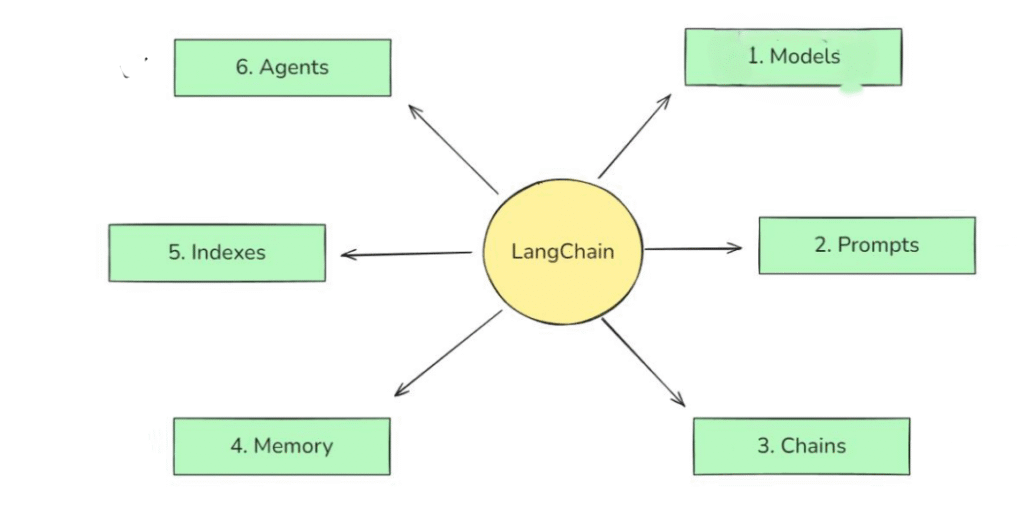
1.Model
In LangChain, “models” are the core interfaces through which you interact with AI models
In LangChain, “models” are the core interfaces through which you interact with AI models
Two Types of Model
1.Chat Model
A chat model is designed to understand and generate text responses.
It takes a message or question as input and replies in natural language, just like a conversation.
I think of a chat model as the talking and thinking part of an AI system.
It is mainly used in chatbots, virtual assistants, Q&A systems, and content generation.
Code Demo
from langchain_openai.chat_models import ChatOpenAI

from dotenv import load_dotenv

import certifi

import os
load_dotenv()

os.environ['SSL_CERT_FILE'] = certifi.where()
llm = ChatOpenAI(

model="gpt-4o-mini",

temperature=0

)

results = llm.invoke('What is Capital of India')

print(results.content)
2. Embedding Model
An embedding model converts text into numerical vectors that represent meaning.
Instead of talking, it helps the system understand similarity between texts.
I see embedding models as the understanding and searching part of an AI system.
They are used to find related documents, search knowledge bases, and retrieve relevant information.
Code Demo
from langchain_huggingface import HuggingFaceEmbeddings
embedding = HuggingFaceEmbeddings(model_name='sentence-transformers/all-MiniLM-L6-v2')
documents = [

"Delhi is the capital of India",

"Kolkata is the capital of West Bengal",

"Paris is the capital of France"

]
vector = embedding.embed_documents(documents)
print(str(vector))
2.Prompt
A prompt is how we talk to the model.
It’s not just a question—it’s an instruction.
I realized that a good prompt is like giving clear directions to a person. If instructions are vague, the response will also be vague.
1. Role-Based Prompt
from langchain_core.prompts import ChatPromptTemplate

chat_template = ChatPromptTemplate([

('system', 'You are a helpful {domain} expert'),

('human', 'Explain in simple terms, what is {topic}')

])

prompt = chat_template.invoke({'domain':'cricket','topic':'Dusra'})

print(prompt)
2.Few Shot Prompting
from langchain.prompts import PromptTemplate

#template

template = PromptTemplate(

template="""

Please summarize the research paper titled "{paper_input}" with the following specifications:

Explanation Style: {style_input}

Explanation Length: {length_input}

1. Mathematical Details:

- Include relevant mathematical equations if present in the paper.

- Explain the mathematical concepts using simple, intuitive code snippets where applicable.

2. Analogies:

- Use relatable analogies to simplify complex ideas.

If certain information is not available in the paper, respond with: "Insufficient information available" instead of guessing.

Ensure the summary is clear, accurate, and aligned with the provided style and length.

""",

input_variables=['paper_input', 'style_input','length_input'],

validate_template = True

)

template.save('template.json')
3.Chain
A chain connects steps together.
Instead of asking the model one thing, a chain allows multiple steps to run in orde
4.Memory
Memory helps the system remember past interactions.
Without memory, every question feels like the first conversation.
Memory is what makes chatbots feel human and continuous. It stores context, previous questions, or summaries of conversations.
5.Indexes
Indexes connect your application to external knowledge—such as PDFs,
websites or databases
6.Agent
An agent is a decision-maker.
It decides what to do next.
Instead of blindly following steps, an agent can choose tools, search data, or ask follow-up questions. This makes systems flexible and closer to real reasoning.